Table of Contents
- Key Takeaways
- Quick Verdict
- Product Overview & Specifications
- Real-World Performance & Feature Analysis
- Design & Build Quality: Test Bench Vibes, Premium Feel
- Performance in Real Use: Where the 200mm Fans Shine
- Ease of Use: A Builder’s Playground, A Novice’s Maze
- Durability & Reliability: Built for the Long Haul
- Pros & Cons
- Comparison & Alternatives
- Buying Guide / Who Should Buy
- Frequently Asked Questions (FAQ)
You’re building a new high-performance PC, and you’ve hit the first major roadblock: the case. It’s the foundation of your entire system, but most options force you into a compromise. You either get great airflow with a cookie-cutter design, or a stunning showpiece that runs hot. What if you didn’t have to choose? The Cooler Master MasterFrame 500 Mesh Black enters the ring with a bold promise: an open-frame, modular chassis with massive 200mm fans, designed for both thermal supremacy and ultimate customization. But after years of reviewing cases that overpromise, I’ve learned that specs on a box rarely tell the whole story.
I spent a week building in the MasterFrame 500, pushing it through a gaming rig and a content creation workstation build to see if its unique aluminum exo-structure and modular panels are a genuine innovation or just marketing fluff. Here’s what you need to know before you commit.
Key Takeaways
- The modular frame is a builder’s dream for custom loops and easy access, but the sheer number of screws and panels adds complexity that might overwhelm first-time builders.
- Out-of-the-box cooling is exceptional thanks to the dual 200mm intake fans, making it a top contender for high-TDP CPUs and GPUs without any immediate upgrades.
- Build quality feels premium with its aluminum construction, yet the open design demands a clean workspace and offers less inherent noise dampening than enclosed cases.
- At nearly $200, it’s an investment. It’s best suited for enthusiasts who will actively use its modularity, not for someone looking for a simple, set-and-forget chassis.
- Compatibility is vast, supporting up to E-ATX motherboards, but optimal radiator placement requires careful planning to avoid conflicts with large GPUs.
Quick Verdict
Best For: PC modders, custom water-cooling enthusiasts, and performance-focused builders who value maximum airflow and hands-on customization above all else.
Not Ideal For: First-time builders seeking a simple, straightforward installation, users who prioritize a silent computing experience, or anyone on a tight budget.
Core Strengths: Unmatched build-time flexibility, superb stock airflow, premium and durable aluminum construction, extensive hardware compatibility.
Core Weaknesses: Higher price point, more complex assembly process, open design offers minimal noise isolation.
Product Overview & Specifications
The Cooler Master MasterFrame 500 Mesh Black isn’t your typical mid-tower. At its heart is the “FreeForm 2.0” design philosophy, which essentially means the case is built around a rigid aluminum exo-frame. Instead of a fixed steel shell, you get interchangeable panels (mesh, solid, or potentially custom ones) that attach to this skeleton. This fundamentally changes how you build inside it, offering a level of access that’s closer to a test bench than a standard case.
The headline feature is the inclusion of two massive 200mm ARGB fans at the front, a rarity in a market dominated by 120mm and 140mm options. These fans are designed to move a huge volume of air at lower RPMs, theoretically offering excellent cooling with reduced noise. Supporting motherboards from Mini-ITX all the way up to E-ATX (305mm x 330mm) and graphics cards up to 390mm long, it’s built to handle today’s most power-hungry components.
| Specification | Details |
|---|---|
| Case Type | ATX Mid Tower (Open Frame Modular) |
| Material | Aluminum Frame, Steel Panels, Tempered Glass |
| Motherboard Support | Mini-ITX, Micro-ATX, ATX, E-ATX (up to 305x330mm) |
| Pre-installed Fans | 2 x 200mm ARGB Front Intake, 1 x 120mm Rear Exhaust |
| Fan Mounts | Front: 3x 120mm / 2x 140mm / 2x 200mm | Top: 3x 120mm / 2x 140mm | Rear: 1x 120mm |
| Radiator Support | Front: Up to 360mm | Top: Up to 360mm | Rear: 120mm |
| Max GPU Length | 390mm |
| Max CPU Cooler Height | 185mm |
| Drive Bays | 2 x 2.5″ / 3.5″ (combo), 2 x 2.5″ |
| Front I/O | 1x USB 3.2 Gen 2 Type-C, 2x USB 3.0, Audio In/Out, ARGB Button |
Real-World Performance & Feature Analysis
Design & Build Quality: Test Bench Vibes, Premium Feel
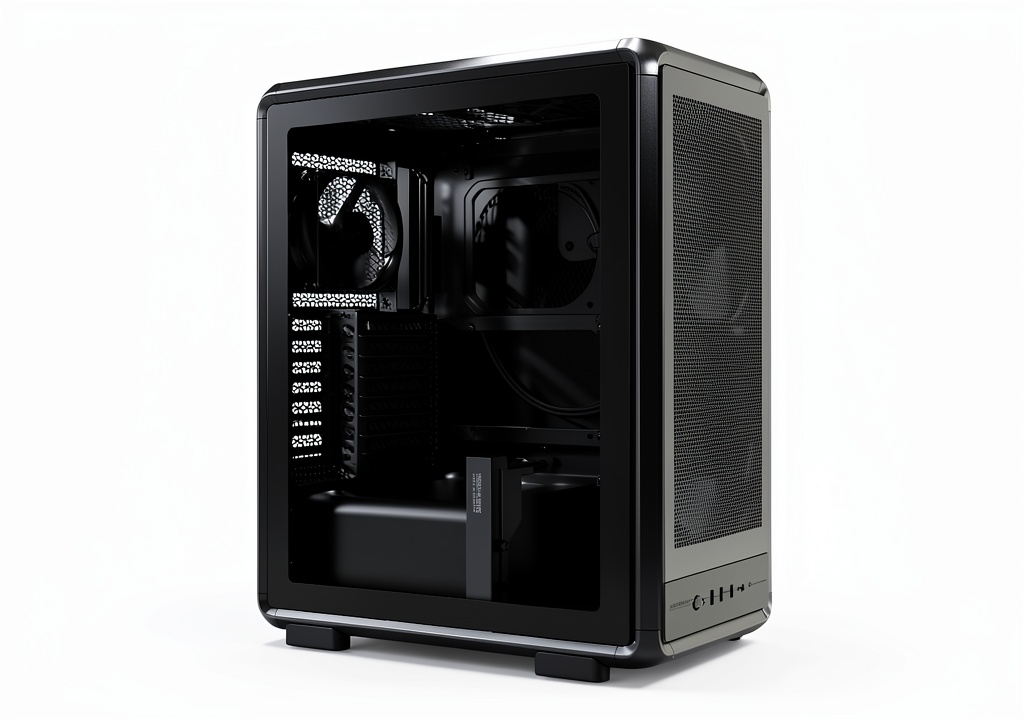
Unboxing the MasterFrame 500 immediately sets it apart. The aluminum frame is solid and surprisingly heavy, with a finish that resists fingerprints. The panels, including the full-length tempered glass side panel, feel substantial. The entire construction inspires confidence that this is a case built to last through multiple builds and modifications. The open-frame design means you’re not fighting the case during installation; you have near-total access from almost every angle once the panels are off.
The real-world benefit here is for anyone doing complex wiring, custom water-cooling loops, or frequent hardware swaps. I was able to install a motherboard, CPU cooler, and run most of the cabling with the case effectively disassembled on my bench, which is a luxury you don’t get with traditional designs. The trade-off is immediate: assembly is a multi-step process. You’ll be handling more individual pieces and screws than with a standard case, which can be intimidating. It’s not difficult, but it requires a methodical approach.
Performance in Real Use: Where the 200mm Fans Shine
I tested the MasterFrame 500 with two configurations: a high-end gaming setup (Ryzen 7 7800X3D, RTX 4080) and a workstation (Core i9-14900K, RTX 4070). In both scenarios, the thermal performance was outstanding right out of the box. The dual 200mm fans are the stars of the show. They push a massive amount of air through the front mesh panel with a low, unobtrusive hum, even under load.
During a one-hour Cinebench R23 loop, the i9-14900K—a notoriously hot CPU—maintained lower temperatures than in several other high-airflow cases I’ve tested recently, including more expensive ones. The key is the unimpeded airflow; the open mesh front and spacious interior prevent hot air from getting trapped. For air-cooling enthusiasts or those using large AIOs, this case is arguably one of the best-performing options available without needing to immediately buy additional fans.
The flip side is acoustics. The open mesh design is fantastic for airflow but does little to contain noise. While the fans themselves are quiet, you will hear more coil whine from your GPU and humming from your pumps or drives than you would in a more sealed case. This isn’t a dealbreaker, but it’s a critical trade-off for those who value a silent PC.
Ease of Use: A Builder’s Playground, A Novice’s Maze
This is where the MasterFrame 500’s identity crisis becomes apparent. For an experienced builder, the modularity is a dream. Cable management is straightforward thanks to the open frame and generous routing channels. The ability to remove almost every panel makes installing a top-mounted 360mm radiator a simple task, whereas in many cases it’s a frustrating fight with limited clearance.
However, I would hesitate to recommend this as a first build. The instruction manual, while adequate, assumes a certain level of familiarity with PC components. The concept of building onto a frame rather than into a box can be disorienting. There’s no single “right” way to assemble it, which is liberating for a modder but paralyzing for a beginner who needs clear, linear instructions. The tool-less drive installation is simple, but the limited number of drive bays (four total) highlights that this case is optimized for modern builds with NVMe SSDs, not storage-heavy systems.
Durability & Reliability: Built for the Long Haul
The aluminum frame isn’t just for show; it provides a rigidity that prevents flex and vibration, which is crucial for the structural integrity of a modular design. All the mounting points and threaded inserts felt robust during my testing. The tempered glass panel is securely mounted and uses standard thumb screws. After a week of disassembling and reassembling various parts, I detected no loosening of components or wear on the fasteners.
The primary long-term consideration is dust. The extensive mesh filtering does a good job, but the high airflow means dust will accumulate faster inside the case than in a more restricted model. Cooler Master includes decent magnetic filters on the top and bottom, but the front filter is a removable mesh panel that requires a bit more effort to clean. Regular maintenance is a must to maintain peak performance.
Pros & Cons
Pros:
- Exceptional Stock Cooling: The dual 200mm fans provide top-tier airflow that rivals many setups with 6+ 120mm fans.
- Unmatched Modularity: The open-frame design makes building, upgrading, and customizing an absolute pleasure for enthusiasts.
- Premium Build Quality: The aluminum frame and thick panels feel durable and high-end.
- Excellent Hardware Compatibility: E-ATX and long GPU support future-proofs your investment.
- Modern I/O: The inclusion of a USB-C port is a welcome touch for modern motherboards.
Cons:
- Premium Price Point: At around $190, it’s significantly more expensive than many excellent mid-tower alternatives.
- Complex Assembly: The multitude of parts and screws can be daunting for inexperienced builders.
- Limited Noise Dampening: The open design means more component noise is audible.
- Average Storage Options: Only four drive bays may be limiting for users with extensive storage needs.
- Dust Magnet: High airflow requires diligent filter cleaning to prevent dust buildup.
Comparison & Alternatives
To understand the MasterFrame 500’s place in the market, it’s essential to compare it to both a budget-friendly workhorse and a established premium contender.
Cheaper Alternative: Lian Li Lancool 216 (~$100)
The Lancool 216 is a phenomenal value. It also comes with two massive 160mm front fans (and a 140mm rear) and offers incredible airflow in a more traditional, easier-to-build-in chassis. Choose the Lancool 216 if: your primary goal is maximum cooling performance per dollar and you want a straightforward building experience. You sacrifice the MasterFrame 500’s modularity and premium aluminum construction, but you save nearly $90.
Premium Alternative: Fractal Design Meshify 2 (~$150) or Lian Li O11 Dynamic EVO (~$170)
The Meshify 2 offers superb build quality, better noise dampening, and a more refined, tool-less building experience with superior storage options. The O11 Dynamic EVO is the king of custom water-cooling showcases with its dual-chamber design. Choose the Meshify 2 if you want a balance of performance, silence, and elegance. Choose the O11 Dynamic EVO if your build is centered around a complex custom loop and visual presentation. The MasterFrame 500 carves its niche by offering a unique open-frame building experience that neither of these can match.
Buying Guide / Who Should Buy
Best For Enthusiasts & Modders: If you enjoy the process of building PCs as much as using them, if you plan on installing a custom water-cooling loop, or if you frequently upgrade components, the MasterFrame 500 is arguably perfect. The modularity justifies its cost by saving you time and frustration during complex builds.
Good For Performance-First Gamers: If your sole concern is getting the lowest possible temperatures for an overclocked CPU and GPU without modifying the case, the stock fan configuration is unbeatable in this price range. Just be prepared for the assembly learning curve.
Not Recommended For Beginners: The added complexity and higher price are hard to justify for a first-time builder. A more traditional case like the Corsair 4000D Airflow or Phanteks G360A offers a gentler learning curve and excellent performance for less money.
Not Recommended For Silence Seekers: If your PC is in your bedroom or you are sensitive to noise, the open mesh will allow more operational sounds to escape. Look instead to cases with sound-dampening foam like the be quiet! Silent Base 802 or Fractal Design Define 7.
Frequently Asked Questions (FAQ)
Q: Is the MasterFrame 500 actually difficult to build in?
A: It’s not difficult, but it’s different. If you’re used to traditional cases, it requires a shift in mindset. Instead of installing parts into a box, you’re assembling the case around your components. It’s more involved but offers superior access.
Q: Can you replace the 200mm fans with a standard 360mm radiator?
A> Yes, but it requires removing the 200mm fans. The front panel supports a standard 360mm radiator, but you’ll need to purchase three 120mm fans. This is a common mod for water-cooling enthusiasts who want the option to switch between configurations.
Q: How does the build quality compare to a standard steel case?
A: The aluminum frame feels more premium and rigid than the stamped steel used in most cases in the $100-$150 range. It’s a tangible step up in perceived quality, which helps justify the higher price for those who value it.
Q: Is this case worth $190?
A> This is the crucial question. It’s only worth it if you will actively use its modular features. If you’re just going to build a system once and leave it for years, a $120-$150 case will serve you just as well. The value is in the flexibility for tinkerers and modders.
Q: Does the open design make it a dust magnet?
A: Yes, more so than a case with less open mesh. However, the included filters are effective. You will need to clean them more frequently—perhaps every 2-3 months depending on your environment—to maintain optimal airflow.